• Aumentar letra
  • Reducir letra
  • Aumentar Espaciado
  • Disminuir Espaciado
  • Escala de Grises
  • Contraste
  • Fuente Dislexia
  • Restablecer
  • Centro de relevo

Encuentra lo que necesitas en segundos. Explora, descubre y obtén respuestas rápidas. ¡Comienza tu búsqueda ahora!

Download the App!

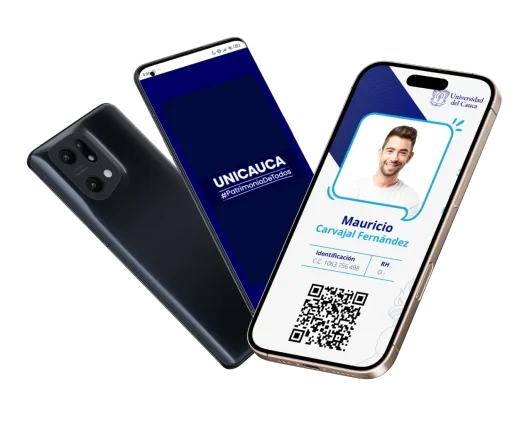
Quickly and securely access the University of Cauca Digital ID Card from your mobile device.

Carnet Digital
Carnet Digital

What is the Digital ID Card?

The Institutional Digital ID Card is a technological tool that allows students, faculty, administrative staff, and graduates to carry their university identification in digital format on their mobile device. Its implementation aims to facilitate institutional identification, strengthen the University’s digital transformation, and improve the user experience in accessing institutional services and facilities.

Who can use it?

Icono Estudiantes
Imagen Docentes
Imagen Administrativos
Icono Contratista

Active students


Faculty


Administrative Staff


Authorized Contractors


Benefits

Imagen Portabilidad

Portability​

Always carry your institutional identification with you.

Imagen Seguridad

Security

Information protected and institutionally validated.

Carnet Digital

Updates

Data is permanently synchronized with the institutional systems.

Sostenibilidad

Sustainability

Reduces the use of physical materials and contributes to environmental protection.

imagen Accesible

Quick Access

Available from your mobile device at any time.

How to Get Your Digital ID Card?

Carnetización

La División de Tecnologías de la Información y las Comunicaciones, expide los carnets para:

  • Estudiantes de pregrado y/o posgrado. 
  • Egresados.
  • Administrativos, contratistas y funcionarios.
  • Docentes temporales y de planta. 
  • Duplicados. 
Solicitud de carnet

Requisitos Expedición

Imagen frontal de ejemplo del documento de identidad
Imagen posterior de ejemplo del documento de identidad

Copia escaneada legible en PDF de su documento de identidad. 

(Por ambas caras).

Una fotografía 3 x 4, un sólo fondo ya sea azul o blanco.

Frequently Asked Questions

How do I get my Digital ID Card?

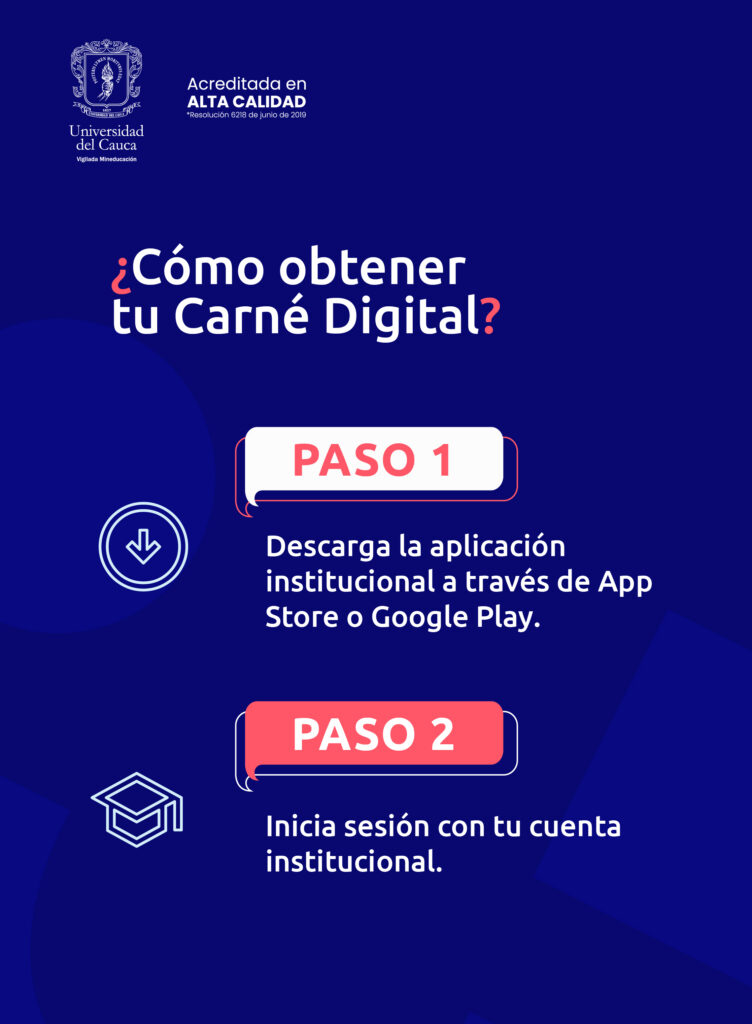
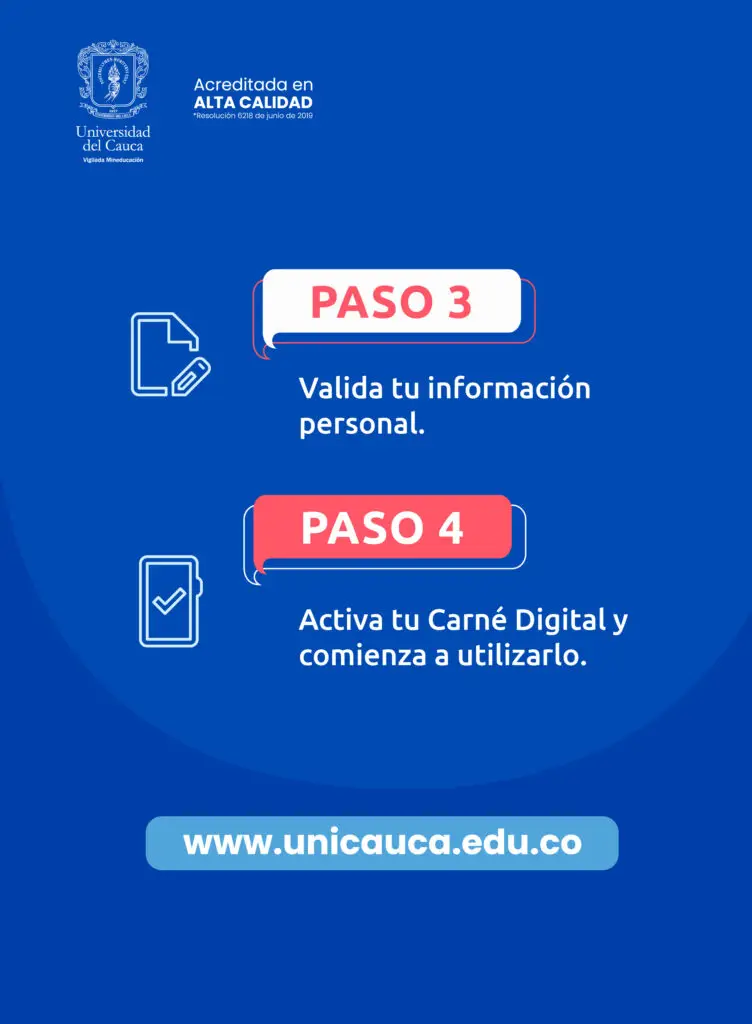
Once the service has been enabled for your user account, you will be able to access the Digital ID Card by logging in with your institutional credentials.

Graduates

They must submit a request to carnetizacion@unicauca.edu.co. If they have an active institutional account, they must do so through the SATIS application, attaching the payment receipt, the card issuance request form, and a copy of the graduation certificate. Once the receipt has been paid and the form completed, access to the Digital ID Card will be activated.

Contractors and Employees

They must submit a request to carnetizacion@unicauca.edu.co. If you have an active institutional account, you must use the SATIS application to submit the Card Issuance Request Form, attaching the duly signed contract or the administrative act of appointment and a copy of your identity document. Once the form has been completed, you will be notified by email that the Digital ID Card has been activated on your devices.

Duplicate ID Card

They must submit a request to carnetizacion@unicauca.edu.co, and if you have an active institutional account, you must do so through the SATIS application, attaching the payment receipt and the Card Issuance Request Form. After making the payment and completing the form, report to the CONTACTO 55 office.

Will the physical ID card stop working?

No. In an initial stage, the Institutional Digital ID Card will coexist with the physical ID card as part of the digital transformation strategy of the University of Cauca. This process will allow for a gradual transition, giving the university community the necessary time to become familiar with the new tool.

Do I need an internet connection to display it?

Yes. Currently, the Institutional Digital ID Card requires an internet connection for consultation and validation, since the information is securely obtained through the institutional systems. To facilitate its use, the University of Cauca provides network coverage and internet access at its different campuses and academic and administrative spaces, allowing the university community to access their Digital ID Card whenever required within the institutional facilities.


What should I do if I change my mobile phone?

You only need to install the application on your new device and log in with your institutional credentials. Your Digital ID Card will be available again once you complete the authentication process.

Who can see my data?

Only the information authorized by the University for institutional identification processes will be visible. Access to this data is carried out in accordance with the information security and protection guidelines established by the Institution.

What should I do if my mobile phone is lost or stolen?

You will be able to access your Digital ID Card again from another device by logging in with your institutional credentials. If you believe your account may have been compromised, change your institutional password as soon as possible.

Can I have the Digital ID Card on more than one device?

No. For security reasons, the Digital ID Card can only be active on one device at a time. If you log in on a new mobile phone, the session you have open on the previous device will be automatically closed.

What information does the Digital ID Card contain?

It contains the information necessary to identify a member of the university community, in accordance with institutional policies.

What should I do if my information appears to be incorrect?

You must contact the responsible office, the IT Division Service Desk, or write to the email address carnetizacion@unicauca.edu.co to request the update of your information.

What should I do if I cannot log in?

Verify that you are using your institutional credentials. If the issue persists, contact the IT Division Service Desk or write to the email address carnetizacion@unicauca.edu.co

What benefits does the Digital ID Card offer?

It provides a modern, secure, and easily accessible means of identification, reducing the use of physical ID cards and facilitating access to institutional services.

Support and Assistance

Do you need help?

The Information and Communications Technologies (ICT) Division provides support channels to assist you throughout the activation and use of the Digital ID Card.

The Institutional Digital ID Card is part of the initiatives aimed at strengthening technological modernization, optimizing university services, and offering innovative solutions for the entire university community.
Active Users
0

Institution with High Quality Accreditation for 8 years, resolution MEN 6218 of 2019 - Vigilada MinEducación

  • Aumentar letra
  • Reducir letra
  • Aumentar Espaciado
  • Disminuir Espaciado
  • Escala de Grises
  • Contraste
  • Fuente Dislexia
  • Agrandar Cursor
  • Resaltar Enlaces
  • Restablecer
  • Centro de relevo

Universidad del Cauca

NIT. 891500319-2

Address: Calle 5 # 4 - 70 | Popayan, Colombia

Telephone: +57 (602) 820 9900

Toll-free: 018000 949020

Requests, Complaints, Claims, Suggestions and Congratulations
Email: ventasreclamos@unicauca.edu.co

Judicial notifications
Email:processes@unicauca.edu.co

Follow us on:

Institution with High Quality Accreditation for 8 years, resolution MEN 6218 of 2019 - Vigilada MinEducación